
Download PulseFire
Latest version: 1.0.5
- Download
Windows x64
exe / 3.07 MB / v1.0.5
sha256 4a773f93660c117e623975ab144bbdefdc5730122d6618cf7d8ffff78daca719
- Download
macOS Apple Silicon
dmg / 4.20 MB / v1.0.5
sha256 5a55c13b40fc80a2d0233a04cf6bbe365739dcd805a96d095b1a08d6a51c1a21
- Download
macOS Intel
dmg / 4.63 MB / v1.0.5
sha256 3217f1afdca162877de91ccdfceb8c22b0afd1b5109c51c80054e28b1a5761eb
- Download
Linux x64
AppImage / 79.7 MB / v1.0.5
sha256 77dcef9ee9fb78876585a0e96e4347111afb50f022d991c72b880cca9cf504dd
- Download
Linux Debian / Ubuntu
deb / 5.23 MB / v1.0.5
sha256 fb5960547953bcda691c908fd7acc7d446f8dc8c732b6d1bc733813082a46480
Built for people who care which file they get.
Most downloaders give you a button and a guess. PulseFire shows what is available, then does exactly that.
Formats, not guesswork
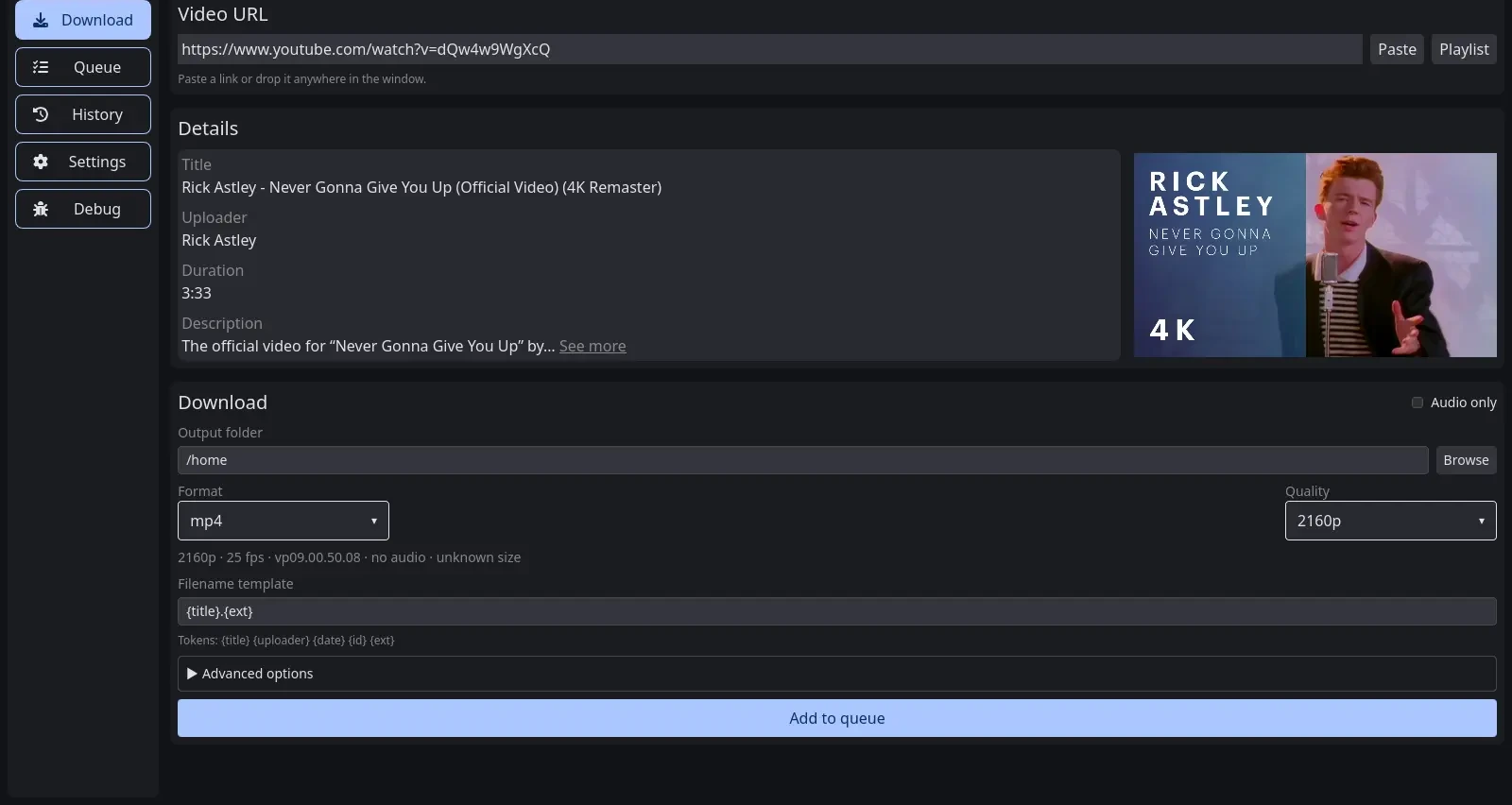
Pick the container, resolution, and codec. PulseFire lists the real video and audio streams, with size and bitrate, before anything starts.
Audio when that's all you need
Extract to mp3, m4a, or opus at the bitrate you choose. No video stream, no wasted bandwidth.
A queue that behaves
Run one to four downloads at once, watch speed and time remaining, and cancel any job without losing the rest.
Files stay on your machine
No account, no cloud, no uploads. You choose the folder and the app writes there, with a filename template you control.
The tedious parts handled
Subtitles, thumbnails, metadata, SponsorBlock segments, trims, speed limits, and retries are checkboxes, not command-line flags.
It matches your desktop
System, light, or dark theme, in a compact window that stays out of the way on small screens.
Three steps, then it is on your disk.
- 01
Paste a link
Drop a URL in the box or pull it from the clipboard. PulseFire reads the available streams in a moment.
- 02
Choose a format
Resolution, container, codec, bitrate, audio-only. The file size is shown before you commit.
- 03
Keep the file
Downloads run in a queue you control and land in the folder you picked.
Questions, answered plainly.
Which sites are supported?
PulseFire uses yt-dlp under the hood, which covers YouTube, X, TikTok, Instagram, SoundCloud, Vimeo, Reddit, Twitch, and roughly a thousand more. The full list lives in the yt-dlp documentation and changes as sites change.
Where do downloads go?
A folder you choose in Settings. The app writes files locally with the filename template you set. Nothing is uploaded anywhere.
Does it run on my computer?
PulseFire ships for Windows 10 and 11, macOS on Apple Silicon and Intel, and Linux as an AppImage or .deb package.
Is downloading videos legal?
It depends on the content and where you live. Download only what you have the rights to, and respect each site's terms. PulseFire does not host or distribute any media.
Help keep PulseFire free.
The app is free to download and use. If it saves you time, a donation helps cover hosting and the work behind each release.